Quick Answer: When you inherit a bad website with poor SEO, start with a Google Search Console audit before touching anything else. Check for manual actions, crawl errors, noindex issues, and sitemap problems in that order. Fix what’s blocking Google from seeing the site before worrying about content or links. The priority sequence is: indexation first, technical cleanup second, content audit third, backlink cleanup fourth, and growth strategy last. Do not run major campaigns or build links on a broken foundation – fix the foundation first.
You didn’t build this mess. But it’s yours now.
Maybe you just took over a business and the previous owner handed you the keys to a site that hasn’t been touched in three years. Maybe the last agency left behind a crawl report that looks like a horror movie. Maybe you’re a new marketing manager at a company where nobody really knew what they were doing with SEO, and you’ve just pulled up Google Search Console for the first time and the errors are stacking.
Whatever the situation, inheriting a bad website for SEO purposes is one of the more frustrating things you can walk into – because you’re responsible for fixing damage you didn’t cause, and progress feels slow even when you’re doing everything right.
I’ve been through this cleanup process more times than I can count. At LYNX we’ve done it on acquired brands, on sites handed over from previous agencies, and on businesses where SEO was essentially ignored for years while the owner focused on running the company. Every situation is a little different, but the sequence for fixing SEO technical debt follows a consistent logic.
This article walks through that sequence – what to look at first, how to prioritize, and what actually moves the needle vs. what’s just busy work.
Key Takeaways
- Check for manual actions in Google Search Console before anything else – an active penalty changes everything about your approach
- Indexation problems (noindex tags, robots.txt blocks, crawl errors) have to be fixed before SEO work can have any real effect
- Not all 404s need redirects – only fix the ones with traffic, backlinks, or internal links pointing to them
- SEO technical debt compounds over time; the longer it sits, the more secondary problems it creates
- A site audit is not a to-do list – it’s a prioritization exercise; most issues in a standard audit don’t materially affect rankings
- Backlink cleanup is rarely urgent unless there’s an active manual action; Google ignores most spammy links automatically
- Set a realistic traffic recovery timeline before presenting results to stakeholders – inherited SEO problems can take 3-6 months to recover from even after fixes are deployed
- Content cleanup matters as much as technical cleanup on many inherited sites
Step 1: Access Everything Before You Touch Anything
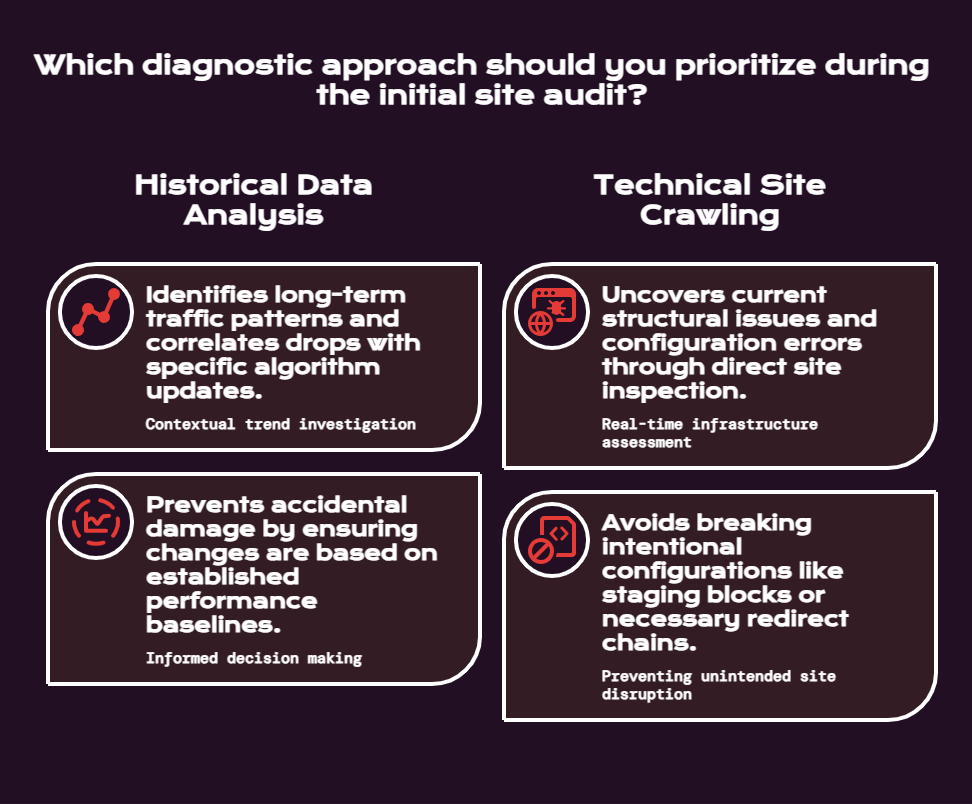
The first thing to do when you take over a site is get access to every tool that has historical data, and then spend time reading before you start making changes.
You need access to:
- Google Search Console (verify all properties – HTTP, HTTPS, www, non-www, any subdomain variants)
- Google Analytics or whatever analytics platform they’re using
- The CMS with admin access
- Ahrefs, Semrush, or Moz – any backlink/keyword tool with historical data
- Screaming Frog or Sitebulb for crawling
- The hosting control panel if you can get it (for server-level redirects and .htaccess)
- The DNS records (relevant for subdomain configuration and staging environment issues)
The reason you read before you touch is because making changes to a site you don’t fully understand yet can make things worse. I’ve seen well-intentioned new SEOs delete a robots.txt disallow rule that was intentionally blocking a staging environment, and suddenly Google starts indexing duplicate content at scale. I’ve seen people fix a redirect chain that turned out to be there for a reason.
Spend at least a few days in observation mode. Pull the historical Search Console data going back as far as it lets you. Look at the traffic trend – when did it drop, and by how much? A traffic collapse at a specific date usually points to a specific cause: an algorithm update, a site migration, a robots.txt change, or a manual action. Cross-reference the drop date against Google’s publicly documented algorithm update history to see if anything lines up.
Step 2: Check for Manual Actions First – Before Anything Else
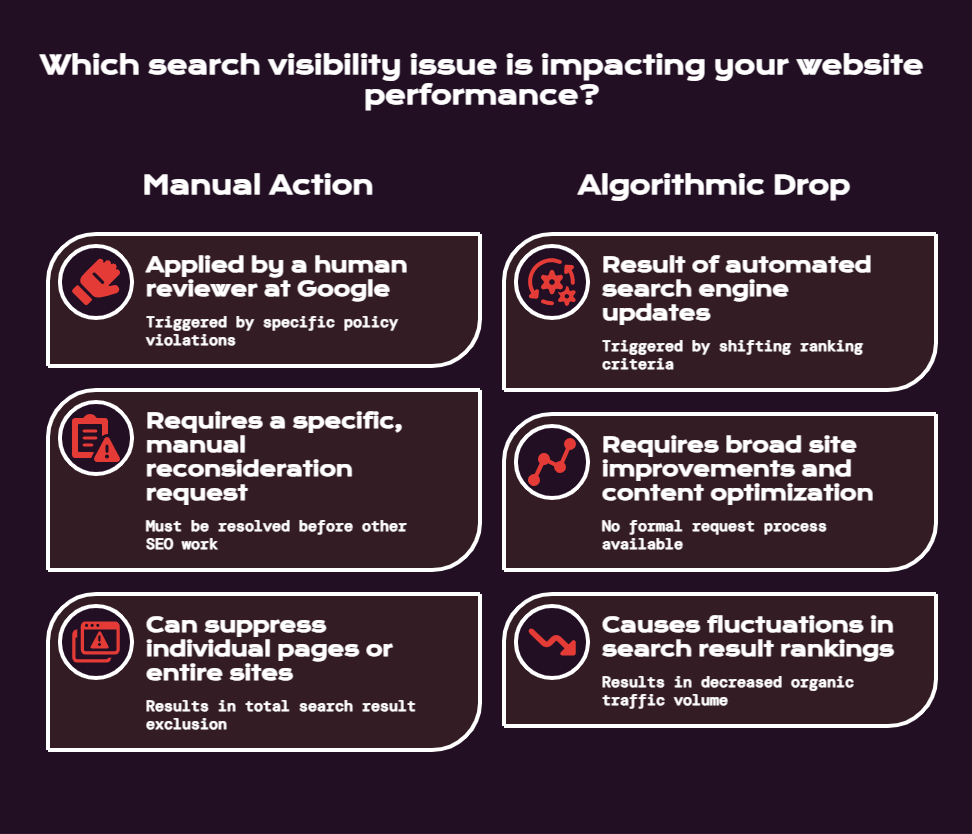
According to Google’s own documentation, a manual action is applied when a human reviewer at Google determines a site violates their spam policies. Manual actions can suppress individual pages, sections, or the entire site from search results. They’re different from algorithmic drops and require a specific recovery process.
Go to Google Search Console > Security & Manual Actions > Manual Actions.

If you see “No issues detected,” you’re clear and can move on. If you see a manual action, the entire recovery approach changes. You’re now in penalty removal mode, which has to happen before any other SEO work will have meaningful effect.
I’ve personally inherited a client site that had an active manual action the previous agency hadn’t noticed for six months. The client had been paying for SEO work the whole time while the site was essentially suppressed. Everything being done was irrelevant until that manual action was resolved.
If there’s an active manual action for unnatural links, the process is:
- Pull a full backlink export using Ahrefs or Semrush
- Identify and document the clearly problematic links (paid links, PBN links, link scheme patterns)
- Attempt to contact the linking sites and request removal
- Build a disavow file for links you can’t get removed
- Submit a reconsideration request through Search Console with documentation of what you did
This takes time and it’s not the most exciting work. But there’s no shortcut around it.
Step 3: Fix Indexation Problems – The Highest Priority Technical Fix for Starting SEO on a Bad Site
Once you’ve confirmed there’s no manual action, indexation is your next stop. Google Search Console’s Page Indexing report shows you exactly which pages are indexed, which are excluded, and why.
The most damaging indexation issues are:
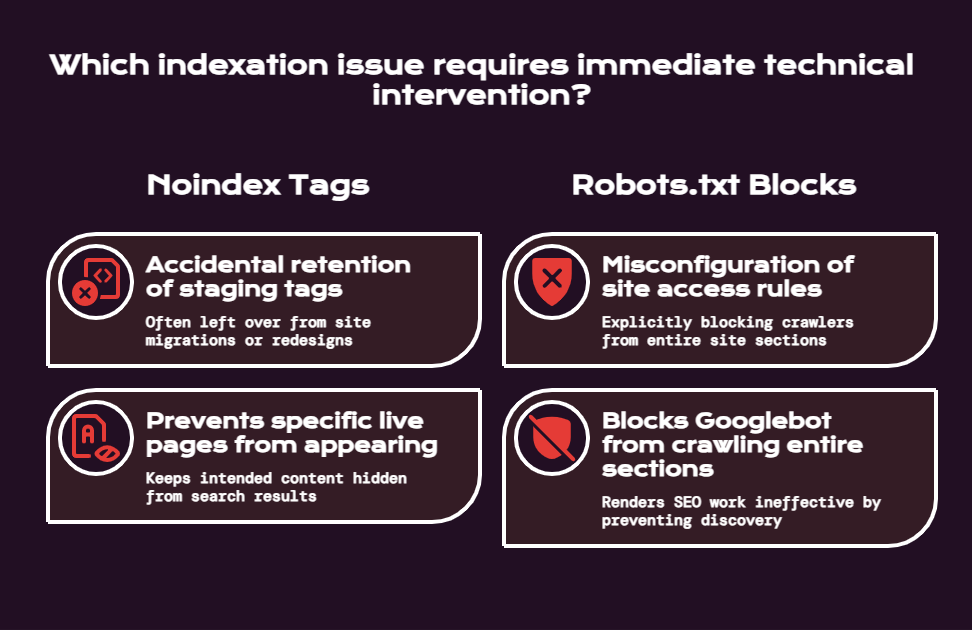
- Noindex on Live Pages: Pages that are live, linked to internally, and meant to be in search – but have a noindex tag that was accidentally left on from staging. This is extremely common after site migrations and redesigns. If you find pages tagged noindex that you actually want indexed, remove the tag and request indexing through Search Console.
- Robots.txt Blocks: A misconfigured robots.txt file can block entire sections of a site from being crawled. Check yours by visiting yourdomain.com/robots.txt. If you see Disallow: / or Disallow: /important-section/, that’s a problem that needs to be fixed before any other SEO work matters.
- Sitemap Problems: Your sitemap should contain only live, indexable, 200-status pages. A sitemap full of 404s, redirects, and noindex pages confuses Googlebot and wastes crawl budget. Audit your sitemap and rebuild it if necessary so it only lists pages you want indexed.
- Crawled But Not Indexed: Pages that Google has found but isn’t indexing are usually thin, low-quality, or near-duplicate pages. These need either meaningful content improvements or consolidation.
The ratio between pages you want indexed and pages Google actually has indexed tells you a lot about the health of the site. If you have 300 pages on a site and Search Console shows 400 indexed URLs, you have a proliferation problem – the site is generating URLs it shouldn’t be, likely from URL parameters, tag pages, or filter combinations that don’t need to be indexed.
Step 4: Website SEO Cleanup – Handling the 404 Redirect Mess
After indexation, the next major cleanup task on most inherited sites is fixing the redirect and 404 situation.
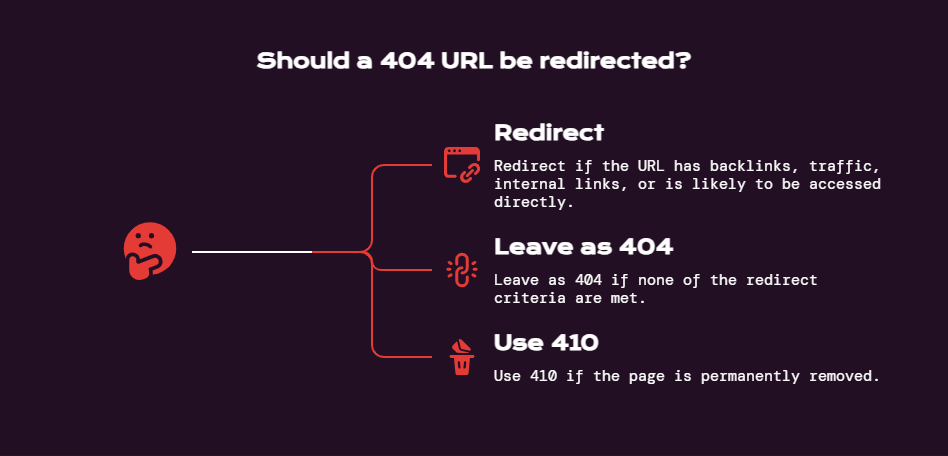
Here’s the rule that saves a lot of wasted effort: not every 404 needs a redirect. According to Google’s own guidance on the disavow tool, Google handles 404s gracefully – they’re a normal part of the web. You only need to redirect a 404 URL if at least one of these is true:
- It has backlinks pointing to it
- It has meaningful organic traffic in historical analytics
- It has internal links pointing to it from important pages
- It’s a URL users are likely to type or access directly
Everything else can be left as a 404, or returned as a 410 (Gone) if you’re certain the page will never come back. A 410 tells Google the page is permanently removed, and Google deindexes 410 pages roughly twice as fast as 404s.
The redirect cleanup process:
- Crawl the site with Screaming Frog to find all 4xx and 5xx errors
- Export the list and cross-reference against your backlink tool to flag URLs with inbound links
- Cross-reference against analytics to flag URLs with historical traffic
- For the ones that meet the criteria above, create 301 redirects to the most topically relevant live page
- For anything being redirected to the homepage with no topical connection, don’t – Google treats those as soft 404s and the homepage absorbs zero benefit
The priority here is to clean up internal links pointing to dead pages, update your sitemap to remove 404 URLs, and fix the redirects that protect link equity from external backlinks. Everything else is maintenance, not emergency work.
SEO Site Audit Recovery: Redirect Chain Cleanup
While you’re in the redirect work, fix any redirect chains. A redirect chain is when URL A redirects to URL B, which redirects to URL C. Each hop loses a small amount of link equity, and chains of three or more redirects start to cause crawling problems. Update chains so that any URL that currently redirects through intermediate hops goes directly to the final destination in a single 301.
Step 5: Crawl Error Cleanup and Technical Debt Triage
Now you have the crawl data from Screaming Frog in hand. The issue with standard site audit tools is that they surface hundreds of “issues” – and most of them don’t materially affect rankings. The skill here is knowing which problems to prioritize.
Crawl Error Cleanup: What Actually Matters
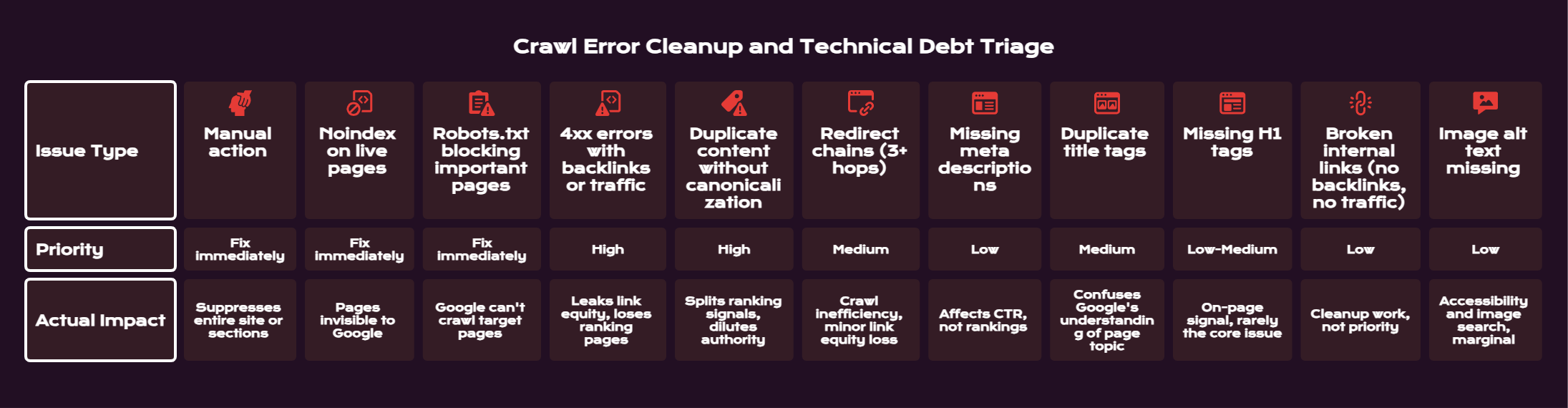
The table below separates the issues that move rankings from the ones that are mostly housekeeping:
| Issue Type | Priority | Actual Impact |
| Manual action | Fix immediately | Suppresses entire site or sections |
| Noindex on live pages | Fix immediately | Pages invisible to Google |
| Robots.txt blocking important pages | Fix immediately | Google can’t crawl target pages |
| 4xx errors with backlinks or traffic | High | Leaks link equity, loses ranking pages |
| Duplicate content without canonicalization | High | Splits ranking signals, dilutes authority |
| Redirect chains (3+ hops) | Medium | Crawl inefficiency, minor link equity loss |
| Missing meta descriptions | Low | Affects CTR, not rankings |
| Duplicate title tags | Medium | Confuses Google’s understanding of page topic |
| Missing H1 tags | Low-Medium | On-page signal, rarely the core issue |
| Broken internal links (no backlinks, no traffic) | Low | Cleanup work, not priority |
| Image alt text missing | Low | Accessibility and image search, marginal |
Don’t let an agency or a tool convince you that a list of 300 issues needs to be fixed before your site can rank. It doesn’t. Focus on the top tier first, then work down when the critical stuff is resolved.
Duplicate Content and Canonical Issues
Duplicate content is extremely common on inherited sites. It shows up in several forms:
- URL Parameter Duplication: The same page accessible at multiple URLs due to tracking parameters, session IDs, or filter combinations (e.g., /products?color=red and /products?sort=price both creating separate indexable pages)
- WWW vs. Non-WWW: If there’s no canonical or redirect consolidating these, Google may be indexing two versions of every page on your site
- HTTP vs. HTTPS: Same problem if the migration to HTTPS wasn’t handled cleanly
- Trailing Slash Inconsistency: /page and /page/ resolving as separate URLs
Fix each of these with canonical tags and/or 301 redirects consolidating to your preferred URL structure.
Step 6: How to Fix a Poorly Built Website for SEO – Core Web Vitals and Technical Site Health
Once the indexation and 404 situation is resolved, it’s time to look at technical performance. Google’s Core Web Vitals are a confirmed ranking factor, and many inherited sites – especially those built by developers who weren’t thinking about SEO performance – have serious issues here.
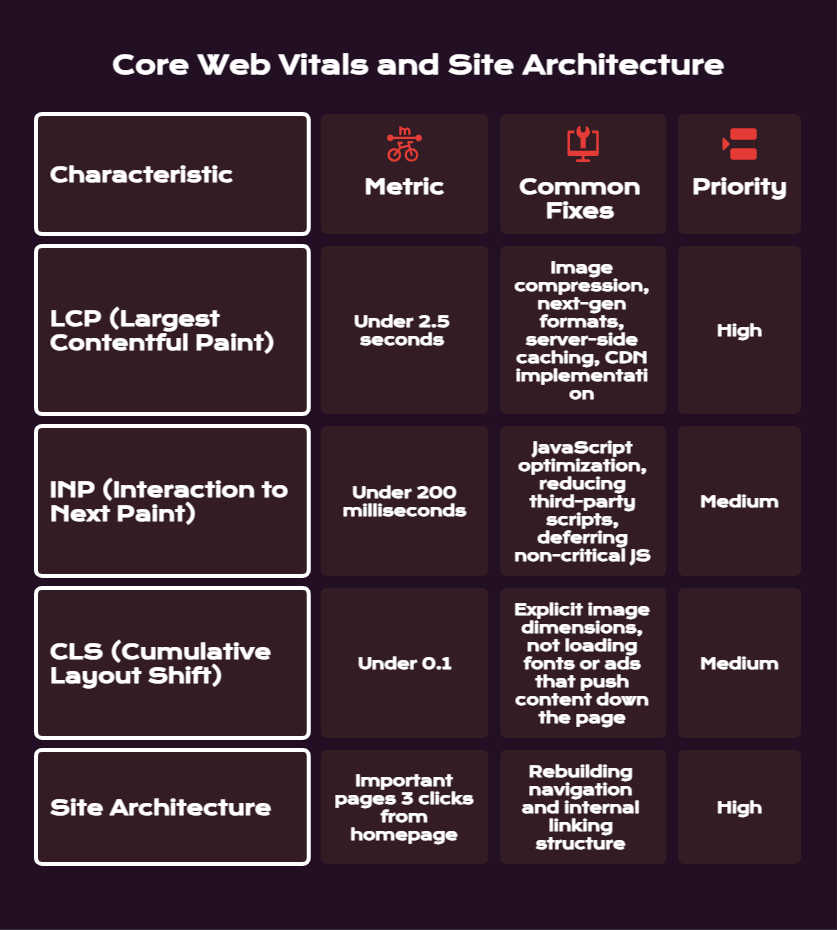
The three Core Web Vitals metrics to hit:
- LCP (Largest Contentful Paint): Under 2.5 seconds. Measures how fast the main content of a page loads. Common fixes: image compression, next-gen formats (WebP), server-side caching, CDN implementation.
- INP (Interaction to Next Paint): Under 200 milliseconds. Measures how fast the page responds to user interactions. Common fixes: JavaScript optimization, reducing third-party scripts, deferring non-critical JS.
- CLS (Cumulative Layout Shift): Under 0.1. Measures visual stability while the page loads. Common fixes: explicit image dimensions, not loading fonts or ads that push content down the page.
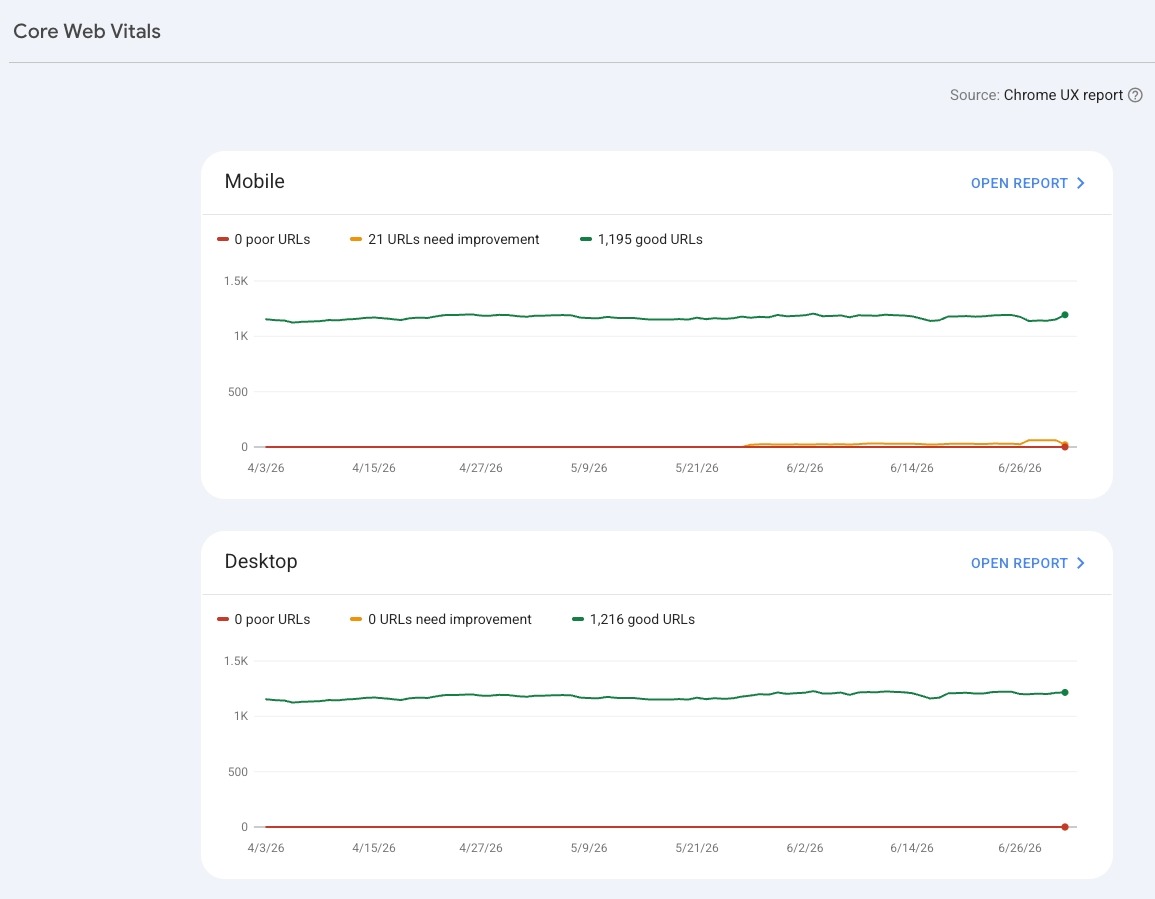
Check your Core Web Vitals in Google Search Console under the Experience section. If you’re in the red across the board, prioritize LCP first – it’s the metric with the most direct correlation to both rankings and conversion rate. A one-second delay in load time can reduce conversions by up to 7%, and 54% of websites currently fail to meet the “Good” threshold across all three metrics.
Many poorly built sites also have site architecture problems that compound over time:
- Important pages buried 4-5 clicks from the homepage, receiving almost no crawl attention or internal link equity
- Flat site structures with no hierarchy, making it impossible for Google to understand what the most important pages are
- Internal linking that’s random rather than strategic, distributing link equity to low-value pages
Fixing site architecture on an inherited site often means rebuilding the navigation and internal linking structure. This is significant work, but it’s also one of the highest-leverage improvements you can make. No important page should be more than three clicks from the homepage.
Step 7: Content Audit – What to Keep, Fix, or Remove
Technical cleanup gets the site to a functional baseline. Content cleanup is where you start to build from that baseline.
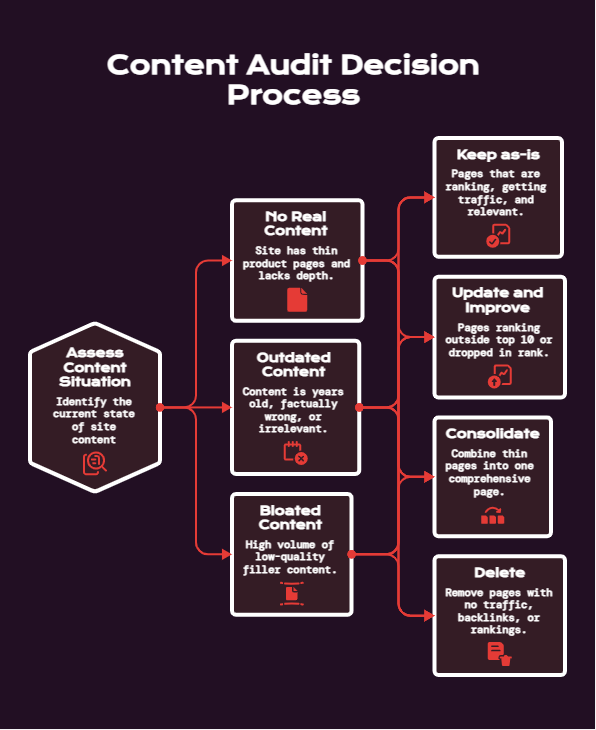
On most inherited sites, the content situation is one of three things:
- No real content: The site has thin product pages, a generic about page, and nothing else. No blog, no educational content, no depth. This is common for small businesses where the owner was focused on running the business and never invested in content.
- Outdated content: There is content, but it’s years old, hasn’t been updated, and is either factually wrong or targeting search intent that no longer matches what users want.
- Bloated content: There’s a lot of content, but much of it is low-quality filler that was produced to hit a word count target rather than to answer a real question. This is common when sites have had high-volume content agencies working on them.
For each piece of content on the site, you’re making one of four decisions: keep as-is, update and improve, consolidate with another page, or delete.
Keep as-is: Pages that are ranking, getting traffic, and are topically relevant. Don’t touch these until you understand them fully.
Update and Improve: Pages that are ranking outside the top 10 for relevant keywords, or that were once ranking and have dropped. These have demonstrated some relevance – they just need to be better.
Consolidate: Multiple thin pages covering the same topic. Combine them into one comprehensive page and 301 the old URLs to it.
Delete (and 410 or redirect): Pages with no traffic, no backlinks, no rankings, and no plausible path to any of those things. Thin tag pages, outdated campaign pages, product pages for discontinued products with no replacement. Removing this content often improves the overall quality signal for the domain.
A useful frame for thinking about this: if you were starting from scratch building the best possible site for this topic, which of your current pages would you keep? That’s your content baseline.
Step 8: Backlink Profile Cleanup – Fixing SEO Technical Debt From Past Link Building
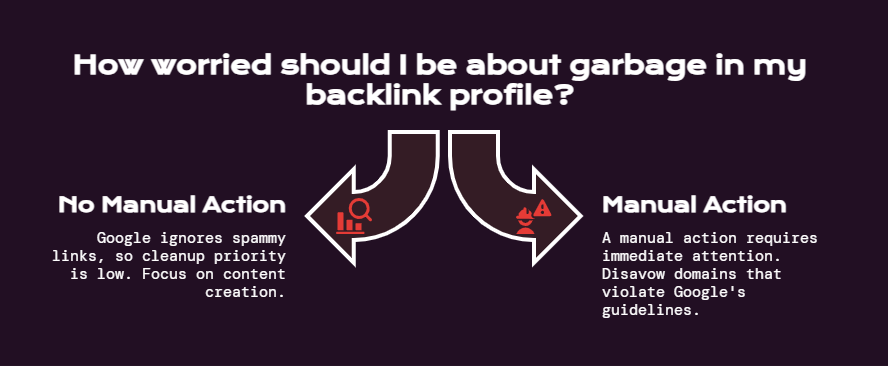
Most inherited sites have some amount of garbage in their backlink profile. Old directory submissions, paid links from a previous agency, comment spam, links from sites that have since turned into link farms. The question is always: how worried should you be about it?
The honest answer is: less worried than most people think.
Since Google’s Penguin 4.0 update (2016), Google’s algorithm shifted from actively penalizing sites for bad links to simply ignoring them. In most cases, a cluster of spammy links won’t tank your rankings – Google just discounts them. The exception is if there’s a manual action for unnatural links, which you’ve already checked in Step 2.
If there’s no manual action, your backlink cleanup priority is low. Do a basic audit with Ahrefs or Semrush to understand the profile, flag anything that looks like a deliberate link scheme from a previous agency, and document it. But don’t spend two weeks building a disavow file for a site that has no penalty – that time is better spent on content.
If you do need to disavow, only disavow domains that clearly violate Google’s guidelines – paid links, PBN links, links built through obvious schemes. Google’s official guidance on the disavow tool is clear that disavowing links that are simply low-quality (but not manipulative) is not helpful and can be harmful if you accidentally disavow legitimate links.
Setting a Realistic SEO Site Audit Recovery Timeline
One of the most important conversations to have when you’ve inherited a bad site is the one about timeline. Stakeholders who have been watching organic traffic decline need to understand what “fixed” actually looks like and when they can expect to see results.
The honest framework is this:
| Phase | Timeline | What’s Happening |
| Audit and diagnosis | Weeks 1-2 | Identifying the scope of problems, no fixes yet |
| Critical technical fixes | Weeks 2-6 | Indexation, manual actions, redirect cleanup |
| Core Web Vitals and site health | Weeks 4-8 | Performance improvements, architecture fixes |
| Content audit and cleanup | Months 2-4 | Updating, consolidating, removing thin content |
| New content and link building | Month 3 onward | Only after foundation is solid |
| Measurable recovery | Months 3-6 | Depending on severity of problems and crawl frequency |
The reason recovery takes 3-6 months even after fixes are deployed is that Google needs to recrawl the fixed pages, reprocess them, and then update rankings. For sites with low crawl budgets, this can be slow.
Set expectations clearly and track leading indicators during this phase – indexed page count improving, crawl errors declining, Core Web Vitals scores moving to “Good” – so stakeholders can see the work is progressing even before rankings and traffic respond.
For a framework on how to project what traffic recovery should look like once the foundation is fixed, see our guide on how to forecast SEO growth. Setting a realistic model early protects you from the expectation that rankings recover the week after you fix a robots.txt.
What to Prioritize After the Cleanup Is Done
Once the site is technically clean and the content has been audited, you’re in a different situation than where you started. You have a site Google can actually crawl and understand. Now growth work – content creation, link building, targeting new keywords – actually compounds instead of fighting against technical drag.
At this stage, the approach shifts from cleanup to expansion:
- Identify keyword opportunities that match the site’s current authority level
- Build out topical content clusters around the core topics the business owns
- Develop a link acquisition strategy based on what the site can actually earn
The sites that recover fastest from inherited SEO problems are usually the ones where someone made a clean separation between “stop the bleeding” and “start building.” The cleanup phase has to come first, and it has to be done right.
For industry-specific examples of what keyword targeting looks like once your foundation is clean, the same principles apply whether you’re in a competitive vertical or a niche market. We’ve covered this for specific industries – from SEO keywords for real estate agents to SEO keywords for graphic designers and SEO keywords for photographers – the keyword targeting process is the same once the technical foundation supports it.
Conclusion
Inheriting a bad website for SEO is genuinely hard work. It’s not glamorous, the wins come slowly, and you spend a lot of time fixing problems you didn’t create. But it’s also one of the highest-leverage situations in SEO – because a technically broken site with decent content and some domain authority is often only a few months of focused cleanup away from performing meaningfully better.
The sequence matters more than the speed. Fix what’s blocking Google before worrying about what you’re saying to Google. Fix the foundation before building on top of it.
Get the indexation right. Clean up the 404s that matter. Fix the Core Web Vitals. Audit the content. Then grow.
If you’ve inherited a site in rough shape and want a second set of eyes on where to start, that’s a conversation we’re happy to have at LYNX SEO. We’ve done this cleanup work across multiple industries and we know the difference between what looks urgent on an audit report and what’s actually costing you rankings.
Frequently Asked Questions
What Do I Do When I Take Over a Website With Terrible SEO?
Start with Google Search Console before making any changes. Check for manual actions first – if there’s an active penalty, that changes everything and has to be resolved before other work matters. Then pull the historical traffic data to understand when drops happened and why. Your first two weeks should be observation and diagnosis, not fixes. Understand what you’re dealing with before touching anything, because uninformed changes can make inherited SEO problems worse.
How Do I Clean Up Years of SEO Problems on an Inherited Site?
Work through them in priority order rather than trying to fix everything at once. The sequence is: (1) manual actions, (2) indexation issues (noindex tags, robots.txt, sitemap), (3) 404 redirect cleanup for URLs with traffic or backlinks, (4) duplicate content and canonical issues, (5) Core Web Vitals and site architecture, (6) content audit, (7) backlink cleanup. Most site audit tools surface hundreds of issues – the majority don’t materially affect rankings. Focus on what’s blocking Google from finding and understanding your pages.
What’s the Priority Order for Fixing a Website With Bad Technical SEO?
The priority order is: manual actions first (if present), then indexation problems, then redirect and 404 cleanup, then duplicate content, then site performance and Core Web Vitals, then content quality, then backlink profile. Everything else in a standard audit is lower priority. A common mistake is spending time on missing meta descriptions or image alt text while the site has noindex tags on its most important pages.
How Do You Audit a Site You Just Took Over?
Start with access: get into Google Search Console, Google Analytics, and a crawl tool like Screaming Frog or Sitebulb. In Search Console, check the Manual Actions report, the Page Indexing report, and the Core Web Vitals report in that order. Run a full crawl with Screaming Frog to inventory all pages and their status codes. Pull the backlink profile with Ahrefs or Semrush. Cross-reference the traffic history against the indexed page count and identify any dates where traffic dropped significantly. That gap between when traffic dropped and what changed on the site is usually where the core problem is.
How Do I Recover Organic Traffic on a Website With a Bad History?
Recovery starts with fixing what’s preventing Google from crawling and indexing the site correctly, then moves to content and link quality. Expect 3-6 months before ranking recoveries become visible in traffic numbers, even after fixes are properly deployed – Google needs to recrawl and reprocess pages before rankings update. Set leading indicators (indexed page count, crawl error count, Core Web Vitals scores) as early signs of progress for stakeholders, so the work is measurable before traffic responds.
How Long Does SEO Recovery Take After Fixing a Poorly Built Website?
It depends on the severity of the problems and how frequently Google crawls the site. In our experience doing this kind of cleanup work, you can expect 3-6 months from the point fixes are deployed to see meaningful ranking recovery. Sites with manual actions, major indexation problems, or severe Core Web Vitals issues on the lower end of that range. Sites that were primarily held back by content quality and thin pages can see improvements faster. The one constant: fixes that aren’t yet deployed can’t recover anything. Getting the technical changes live is always the priority.
What Are Noindex Issues and How Do They Hurt SEO?
A noindex tag is a directive placed in a page’s HTML or HTTP headers that tells Google not to include that page in its search results. When this tag is placed intentionally – on admin pages, thank-you pages, or staging environments – it’s correct practice. The problem is when noindex tags are accidentally applied to pages that should be ranking. This happens most often during site migrations, theme changes, and CMS updates where a staging-environment setting carries over to the live site. Checking for accidental noindex tags is one of the first things to do when auditing an inherited site.
Should I Worry About Toxic Backlinks on an Inherited Site?
Only if there’s a manual action for unnatural links. Since Google’s Penguin 4.0 update, the algorithm generally ignores low-quality links rather than penalizing for them. A backlink profile full of old directory submissions and comment spam is ugly but usually harmless. If a previous agency was running paid link schemes or building PBN links, that’s worth flagging and potentially disavowing – but only after confirming it’s actually causing harm. Disavowing links incorrectly can hurt you more than leaving them alone.
Sources
- Disavowing Backlinks: How to Safely Remove Toxic Links for SEO
- Understanding Core Web Vitals and Google search results | Google Search Central | Documentation | Google for Developers
- Disavow links to your site – Search Console Help
- Block Search Indexing with noindex | Google Search Central | Documentation | Google for Developers
- Page indexing report – Search Console Help
- Manual actions report – Search Console Help
- Google Algorithm Updates & Changes: A Complete History
- Google Search Console
