
Knowing how to find SEO keywords for a website is one of the most valuable skills in digital marketing – and one of the most misunderstood. Most people either skip the process entirely or spend hours pulling numbers from a tool without knowing what to do with them.
This guide walks through the full keyword research process: from building your first seed list, to analyzing difficulty, to mapping keywords to pages that can rank. Whether you’re starting a new site or auditing an existing one, the same process applies.
No fluff. Just the steps.
Key Takeaways
- Keyword research isn’t about finding high-volume terms – it’s about finding terms where you can realistically compete and convert.
- Search intent matters more than search volume. The wrong intent kills your page before it ranks.
- Free tools like Google Search Console and Google’s own autocomplete features are genuinely useful – you don’t need to start with paid tools.
- Competitor keyword research is one of the fastest ways to find terms you’re already missing.
- Long-tail keywords for SEO consistently outperform head terms for conversion, especially on smaller or newer sites.
- Keyword difficulty analysis has to account for your site’s domain authority – not just the score itself.
- If you want this done at scale across a competitive industry, LYNX SEO runs this process for clients every day.
What Keyword Research Is (And What It Isn’t)
Keyword research is the process of identifying the search queries your target audience types into Google – and then figuring out which of those queries are worth targeting.
It’s not about stuffing as many terms as possible into your pages. That stopped working around 2012 and it was never the right approach.
Good keyword research answers three questions:
- What are people searching for?
- What do they want when they search it?
- Can this site realistically rank for this term?
Every part of the process should be filtering toward those answers.
Step 1: Build Your Seed Keyword List
Before you open a tool, you need seed topics. These are the broad themes your site covers.
Think about your core products, services, and the problems you solve. A roofing company’s seeds might be: roof repair, roof replacement, storm damage, leaking roof, gutter installation.
How to generate seed keywords:
| Source | What to do |
| Your own brain | List every product, service, problem you solve, and industry term you know |
| Customer language | Pull words from reviews, support tickets, sales calls |
| Competitor homepages | Skim their nav, headings, and service pages |
| Google autocomplete | Type a seed term and note the suggested completions |
| “People Also Ask” boxes | Search a core term and capture every PAA question |
Write these down in a spreadsheet. Don’t filter yet. You want volume at this stage.
Aim for 20 to 50 seeds before you move on. You’ll expand each of these in the next step.
Step 2: Expand Your Seeds with Keyword Research Tools
Once you have your seeds, tools do the heavy lifting of expansion. They show you what people type, how often, and how hard it is to rank.
Free Tools Worth Using
- Google Search Console: If your site has been live for more than a few months, this is the first place to look. Go to Performance > Search results and sort by impressions. You’ll find keywords you’re already showing up for – some of which you’re not even targeting. This is real data, not estimates. Use it.
- Google Keyword Planner: Free with a Google Ads account. Search volume ranges are broad, but it’s solid for identifying keyword themes and finding terms you haven’t thought of.
- Google Autocomplete and Related Searches: Type your seed into Google. Note the autocomplete suggestions. Scroll to the bottom and grab the “related searches.” These are real queries from real people. Do this in incognito mode to avoid personalized results.
- AnswerThePublic: Wraps Google’s autocomplete data into question-based formats. Good for finding how to find keywords for content – specifically blog posts and FAQ pages.
Paid Tools Worth the Investment
| Tool | Best For | Starting Price |
| Ahrefs | Full keyword research, competitor analysis, backlink data | ~$129/mo |
| Semrush | Keyword research, site audits, rank tracking | ~$140/mo |
| Moz Pro | Simpler interface, good for beginners | ~$99/mo |
| Mangools (KWFinder) | Budget option with solid KD data | ~$29/mo |
If you’re doing serious SEO keyword planning across a full site, the paid tools pay for themselves. The free tools are fine to start, but they’ll slow you down once you’re doing this at scale.
For each seed, run it through your tool of choice. Export the suggested terms. Aim to have at least 100 to 200 keyword ideas before you start filtering.
Step 3: Filter by Search Intent
This is where most people mess up their keyword research strategy.
Search intent is the reason behind a query. Google has gotten extremely good at identifying intent and serving results that match it. If you target a keyword with the wrong content type, you won’t rank – even if you write the best article ever.
There are four main intent types:
| Intent Type | What the User Wants | Example Query | Best Content Format |
| Informational | Learn something | “how does SEO work” | Blog post, guide |
| Navigational | Find a specific site or page | “Ahrefs login” | Homepage, login page |
| Commercial | Research before buying | “best SEO tools 2025” | Comparison post, roundup |
| Transactional | Ready to buy or hire | “hire SEO agency Burlington” | Service page, landing page |
Before you commit to targeting a keyword, search it. Look at the top 5 results.
- Are they blog posts or service pages?
- Are they listicles or in-depth guides?
- Are they targeting buyers or browsers?
Whatever format dominates the SERP, that’s what Google thinks the searcher wants. Match it.
There’s no point optimizing a service page for an informational query. And there’s no point writing a blog post for a transactional term. Search intent keyword research saves you from wasting months on content that will never rank.
Step 4: Analyze Keyword Difficulty
Keyword difficulty (KD) scores tell you how hard it will be to rank for a term. They’re a useful signal, not gospel.
Most tools score KD from 0 to 100. A score of 0-20 is generally low competition. 70+ is highly competitive territory.
But KD scores have to be read in the context of your site.
A domain that’s been around for 10 years with 5,000 backlinks can target KD 60 keywords. A brand-new site with 3 pages and no links should not be going after the same terms.
How to evaluate keyword difficulty analysis realistically:
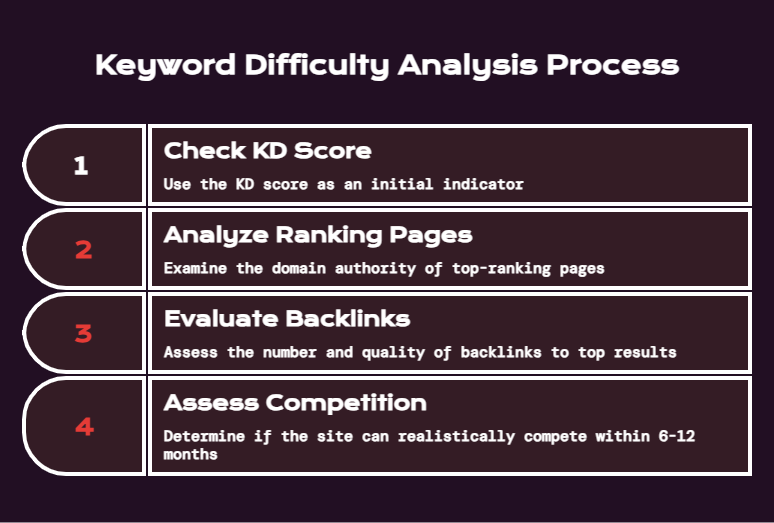
- Check the KD score as a baseline
- Look at the actual pages ranking – what’s their domain authority?
- Check the number and quality of backlinks pointing to the top results
- Ask: could this site realistically compete with those pages in the next 6-12 months?
If the answer is no, move to a lower-difficulty variation of the same topic.
This is why finding low competition keywords matters so much for newer sites. You need to build momentum before swinging at competitive head terms.
Step 5: Prioritize Long-Tail Keywords
Long-tail keywords are longer, more specific search queries. They typically have lower search volume – but also lower competition and higher conversion rates.
“SEO” is a head term. Nobody knows what that person wants.
“how to find SEO keywords for a small business website” is a long-tail keyword. That person knows what they’re looking for, and the right answer converts them.
Why long-tail keywords for SEO work especially well:
- Lower KD scores = faster path to rankings
- More specific intent = higher relevance = better conversion
- Easier to satisfy with one focused piece of content
- Often ignored by bigger sites targeting only high-volume terms
A single blog post targeting a specific long-tail term can drive real leads. I’ve seen it happen with clients in automotive, finance, and SaaS – consistent traffic from a single page targeting a 200 searches/month query, because nobody else bothered.
For how to find keywords for blog posts specifically, long-tail queries are almost always the better play. You’re competing against the whole web on a blog. Find the specific angle nobody else has covered well.
Step 6: Run Competitor Keyword Research
This is one of the fastest, most underused methods in the playbook.
The idea is simple: find what keywords your competitors rank for that you don’t. Then decide which of those you should be targeting.
How to run competitor keyword research with Ahrefs or Semrush:
- Enter a competitor’s domain into Site Explorer (Ahrefs) or Organic Research (Semrush)
- Go to their top organic keywords
- Filter to keywords they rank in positions 1-10
- Export and sort by traffic value or volume
- Cross-reference against your own rankings – look for gaps
You can also use the Content Gap tool in Ahrefs to compare multiple competitors at once against your own domain. It surfaces keywords that two or three competitors rank for but you don’t.
That gap list is your opportunity list.
This applies at the industry level too. If you’re doing keyword research for local SEO, check what the top local competitors rank for in your city. Same principle.
Step 7: Validate with Search Volume
Volume is one input – not the only one.
A keyword with 100 monthly searches that converts to clients is worth more than a keyword with 10,000 monthly searches that drives people who immediately leave.
That said, you can’t ignore volume completely. A keyword with 10 searches per month isn’t worth a full blog post unless it’s hyper-targeted for conversion.
A rough volume framework for prioritization:
| Volume Range | Content Investment |
| 10,000+ /mo | High-authority pages only – expect heavy competition |
| 1,000-10,000 /mo | Core service pages, pillar content |
| 100-1,000 /mo | Blog posts, supporting content |
| Under 100 /mo | Only if intent is highly specific and transactional |
For how to find high traffic keywords, you’re typically looking at the 1,000-10,000+ range. But “high traffic” is relative to your niche. In some B2B verticals, 500 searches per month is huge.
Context matters. Know your industry.
Step 8: Map Keywords to Pages
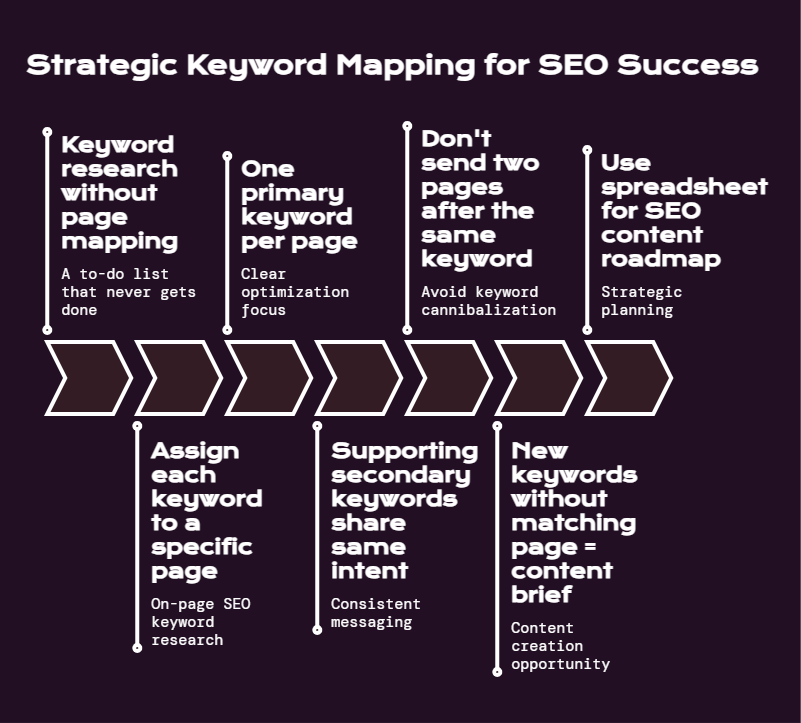
Keyword research without page mapping is a to-do list that never gets done.
Once you’ve filtered your list, assign each keyword to a specific page on your site. This is called on page SEO keyword research – making sure every page has a clear primary keyword it’s optimized for.
The rules for keyword-to-page mapping:
- One primary keyword per page
- Supporting secondary keywords should share the same intent
- Don’t send two pages after the same keyword (keyword cannibalization)
- New keywords without a matching page = content brief to create one
Use a spreadsheet with columns for: keyword, target URL, page type, current ranking, priority. This becomes your SEO content roadmap.
If two of your pages are already competing for the same keyword, pick one to optimize and consolidate the other – either redirect it or refocus it on a different term.
Step 9: Find Niche and Local Keywords
For businesses in specific industries or geographies, generic keyword lists miss the point entirely.
How to find niche keywords comes down to going deeper into your specific topic cluster. If you run a dental practice, “dentist” isn’t a keyword – it’s a category. “Emergency dentist Burlington Ontario” is a keyword.
For local SEO keyword research specifically:
- Always include location modifiers: city, neighborhood, region, “near me”
- Check Google Maps rankings for your service + location terms
- Look at what queries show up in the local pack (the map results)
- Add “[service] + [city]” variants for every core service
We covered the mechanics of this in more depth in our post on local SEO for franchises – the keyword strategy there applies just as well to single-location businesses.
For SEO keyword ideas in specific industries, your best source is often the language your customers use – not the language your industry uses internally. Technical terms rank poorly because nobody searches them.
Step 10: Build a Keyword Research Checklist
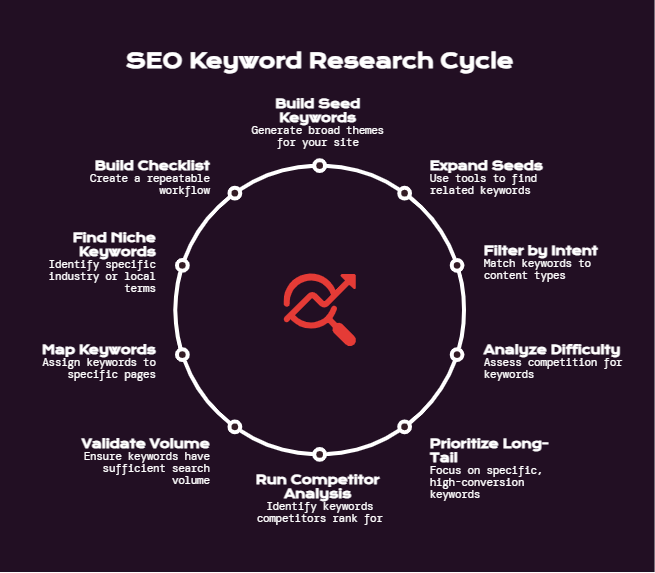
Here’s the full process condensed into a repeatable workflow:
Keyword Research Checklist
- [ ] Define your site’s core topic clusters
- [ ] Generate 20-50 seed keywords from products, services, and problems
- [ ] Expand seeds using GSC, Google autocomplete, and keyword tools
- [ ] Export 100+ keyword ideas per core topic
- [ ] Filter by search intent – match content type to SERP format
- [ ] Score by keyword difficulty relative to your domain authority
- [ ] Prioritize long-tail and low-competition terms for newer content
- [ ] Run competitor gap analysis – find what they rank for that you don’t
- [ ] Check search volume and assign priority tier
- [ ] Map every keyword to a specific page (existing or to be created)
- [ ] Identify local variations if targeting geographic audiences
- [ ] Create content briefs for any keyword gaps
Run this process quarterly. Search trends shift. Competitor content changes. Rankings fluctuate. A keyword strategy that’s static dies.
How to Find Ranking Keywords You Already Have
If your site has been around a while, there’s a good chance you’re already ranking for terms you’re not actively optimizing.
This is often the fastest win available.
How to find keywords for which you already rank:
- Open Google Search Console
- Go to Performance > Search results
- Sort by impressions descending
- Filter to positions 5-20 (the low-hanging fruit)
- Look for high-impression keywords where your click-through rate is low
A keyword where you’re getting 2,000 impressions and 20 clicks means you’re showing up but not winning. Improve the title tag and meta description. Strengthen the content. Push it from position 12 to position 3.
This is how to find ranking keywords and turn existing traffic into more traffic. It’s almost always easier than starting from scratch.
How to forecast what that traffic improvement could look like at scale is a whole other process – we walked through a model for that in our SEO growth forecasting guide.
Keyword Research for Specific Content Types
The same fundamentals apply across content types, but the emphasis shifts.
How to Find Keywords for Landing Pages
Landing pages are transactional. The user wants to hire, buy, or book.
Target keywords with clear commercial or transactional intent. Include location if you’re local. Make sure the KD is realistic. And check that the SERP isn’t dominated by aggregator sites (Yelp, Houzz, HomeAdvisor) – those are hard to displace with a service page.
How to Find Keywords for Blog Posts
Blog content should target informational or commercial intent. Think “how to,” “what is,” “best,” “vs,” “guide.”
Long-tail keywords for SEO are especially strong here. A post targeting “how to clean gutters before winter” will rank and convert better than a post targeting “gutters.”
For industry-specific examples of how this plays out, see our post on SEO keywords for roofers – the same layered approach to keyword selection works in any trade or service vertical.
Keyword Research for Small Websites
Small sites need to pick fights they can win. That means:
- Prioritizing low KD terms almost exclusively early on
- Going deep on a specific niche instead of broad across a category
- Building internal links between related posts to signal topical authority
- Not chasing domain authority competitors with 10x your backlink profile
The path for keyword research for small websites is patient and specific – not spray and pray.
Common Keyword Research Mistakes
Worth running through before you finalize your list:
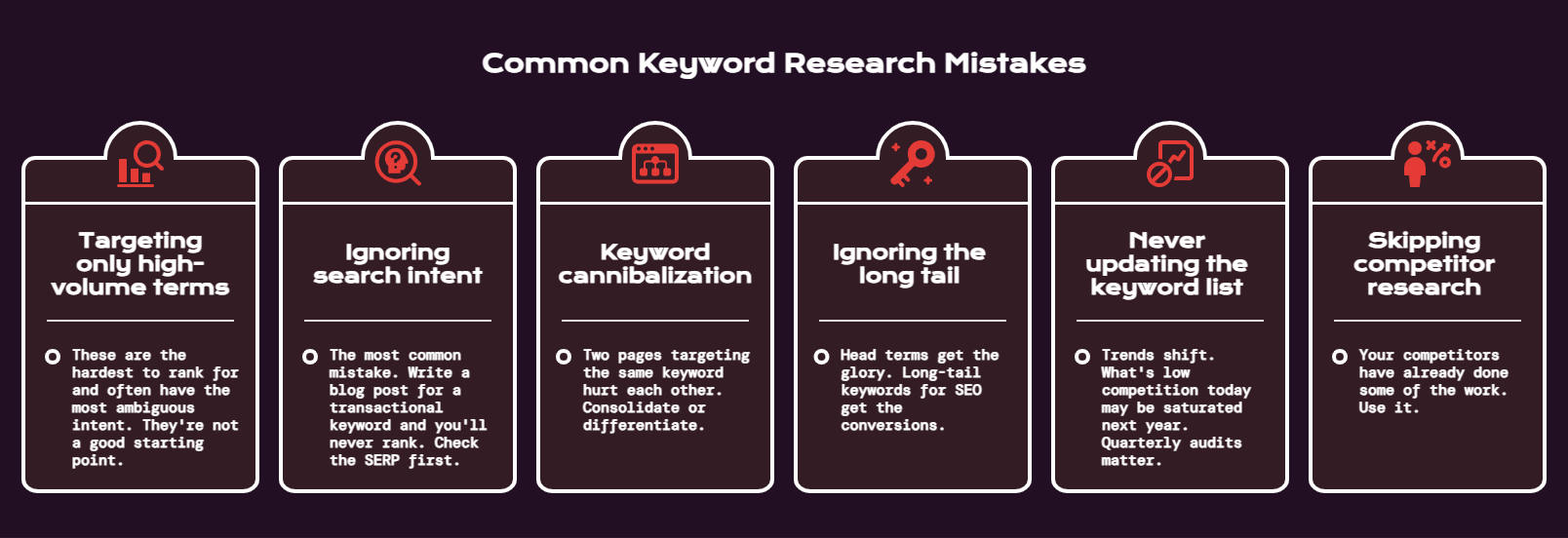
- Targeting only high-volume terms. These are the hardest to rank for and often have the most ambiguous intent. They’re not a good starting point.
- Ignoring search intent. The most common mistake. Write a blog post for a transactional keyword and you’ll never rank. Check the SERP first.
- Keyword cannibalization. Two pages targeting the same keyword hurt each other. Consolidate or differentiate.
- Ignoring the long tail. Head terms get the glory. Long-tail keywords for SEO get the conversions.
- Never updating the keyword list. Trends shift. What’s low competition today may be saturated next year. Quarterly audits matter.
- Skipping competitor research. Your competitors have already done some of the work. Use it.
Tools Summary: Best Tools to Find SEO Keywords
| Tool | Type | Best For | Price |
| Google Search Console | Free | Existing site rankings, real query data | Free |
| Google Keyword Planner | Free | Volume estimates, new keyword ideas | Free with Ads account |
| Google Autocomplete | Free | Fast seed keyword expansion | Free |
| AnswerThePublic | Freemium | Question-based keyword discovery | Free/paid |
| Ahrefs | Paid | Full-stack research, competitor analysis | ~$129/mo |
| Semrush | Paid | Keyword research + site audits | ~$140/mo |
| Moz Pro | Paid | Beginner-friendly KD scores | ~$99/mo |
| KWFinder (Mangools) | Paid | Budget-friendly KD + volume | ~$29/mo |
You don’t need all of them. Start with Google Search Console and one paid tool. That covers 95% of what you need.
SEO Keyword Discovery Techniques
A few less obvious methods that consistently surface good keywords:
- Reddit and forums. Find subreddits related to your niche. Look at what questions come up repeatedly. Those questions are search queries that real people type.
- Amazon and product reviews. If you’re in e-commerce or product-adjacent, reviews tell you the language customers use to describe problems and solutions.
- YouTube autocomplete. Same idea as Google autocomplete, different platform. Useful for finding video and tutorial-style content opportunities.
- Google’s “People Also Ask.” Every PAA box is a keyword opportunity. These are questions Google has verified people search for. They’re usually lower volume but high intent.
- Industry publications. Look at what trade publications and niche blogs write about most. If an industry publication keeps covering a topic, there’s search demand behind it.
We use a version of this technique when building keyword lists for specific verticals. The post on SEO keywords for photographers shows how that process looks in a specific niche – same playbook, different industry.
Putting It All Together
Keyword research for websites isn’t a one-time task. It’s a system you run once to build the foundation, then revisit quarterly as your site grows, your competitors publish new content, and your own domain authority increases.
The process in this guide – seeds, expansion, intent filtering, difficulty analysis, competitor gaps, page mapping – covers everything you need to build a keyword strategy that drives real traffic and real leads. Not just rankings for terms nobody converts on.
The hard part isn’t knowing the steps. It’s executing them consistently across a full site, staying on top of what’s shifting in search, and building out the content volume needed to compete in most niches.
That’s where most in-house teams hit a wall.
If you’re at that point – or you want this done right from the start without burning months figuring it out – LYNX SEO handles keyword research, content strategy, and full-scale SEO execution for companies in competitive industries. Happy to take a look at where your site stands.
Frequently Asked Questions
What Is the Best Way to Do Keyword Research for a Website?
The best method for keyword research for websites combines three inputs: your own knowledge of the business, data from SEO keyword research tools like Ahrefs or Google Search Console, and a review of what competitors are already ranking for. Start with seed topics, expand them with a tool, filter by search intent and keyword difficulty, then map each keyword to a page. That process applies whether you’re doing keyword research for beginners or managing an enterprise site with hundreds of pages.
How Do I Find Low Competition Keywords for My Site?
To find low competition keywords, filter your keyword list by keyword difficulty score below 20-30 in your tool of choice. Then verify manually by searching the term and checking if the top results are from high-authority domains or beatable content. Also look for long-tail keyword variations – they almost always carry lower competition. For new domains especially, keyword research for small websites should prioritize low-difficulty terms almost exclusively in the early months.
What Are the Best Free Tools to Find SEO Keywords?
The best free tools to find SEO keywords are Google Search Console (for existing ranking data and how to find ranking keywords), Google Keyword Planner (for volume estimates and SEO keyword ideas), and Google’s own autocomplete and “People Also Ask” features. These cover a lot of ground before you need a paid tool. AnswerThePublic is also useful for question-based SEO keyword discovery. Keyword research using Google’s free suite is a legitimate starting point for most small sites.
How Do I Find Keywords My Competitors Rank For?
Competitor keyword research is done through tools like Ahrefs Site Explorer or Semrush’s Organic Research. Enter a competitor domain, look at their top ranking keywords, and identify terms where they’re getting traffic that you aren’t. This is one of the best keyword research methods for finding proven opportunities fast. The keyword gap tool in Ahrefs is especially useful – it surfaces terms two or three competitors rank for that your site doesn’t.
What Is the Difference Between Head Keywords and Long-Tail Keywords for SEO?
Head keywords are short, broad terms with high search volume and high competition – like “SEO” or “running shoes.” Long-tail keywords for SEO are longer, more specific queries with lower volume but lower competition and higher conversion intent – like “how to find SEO keywords for a small business website.” Long-tail terms consistently convert better because the searcher knows exactly what they want. They’re also a core part of any keyword research strategy for sites that don’t yet have the authority to compete on broad terms.
How Does Search Intent Affect Keyword Research Strategy?
Search intent is the reason behind a query – whether someone wants to learn, compare, buy, or find a specific page. Your content type has to match the intent. If you target an informational keyword with a service page, you won’t rank. If you target a transactional keyword with a blog post, you’ll rank but won’t convert. Search intent keyword research means checking the SERP for every target keyword before committing to a content format. It’s one of the most important steps in SEO keyword planning that most people skip.
How Often Should I Update My SEO Keyword Research?
At minimum, once per quarter. Search trends change, competitors publish new content, and your own domain authority grows – meaning you can target more competitive keywords over time. For active sites with regular content production, a monthly keyword audit of Google Search Console is worth building into your workflow. How to find ranking keywords you’re already close to winning is often the highest-ROI task in the whole process – especially for established sites with existing impressions.
How Do I Do Keyword Research for Local SEO?
Keyword research for local SEO follows the same steps as general keyword research, with location modifiers added. Combine your service terms with city names, neighborhood names, and “near me” variations. Then check what the local pack looks like for your top terms – the sites ranking in the map results are your local competitors. Also check Google Search Console for queries that already include location terms. How to find niche keywords in a specific geographic area is often about going deeper on local intent rather than broader on volume.
What Is Keyword Difficulty and How Should I Use It in SEO Keyword Planning?
Keyword difficulty analysis is a score (usually 0-100) that estimates how hard it will be to rank for a given keyword based on the strength of pages currently ranking. Use it as a filter, not a rule. A KD of 40 might be reachable for a site with strong authority and solid content. The same score might be out of reach for a new domain. Always cross-reference the score by manually reviewing what’s ranking and estimating whether your site can realistically compete. This is a core part of how to choose SEO keywords – the score alone isn’t enough.
How Do I Identify Target Keywords for a New Website?
For a new website, on page SEO keyword research should focus almost entirely on low-difficulty, long-tail terms. Start by mapping every page to a specific keyword. Prioritize terms with KD below 20-30. Focus on one topic cluster at a time to build topical authority before branching into adjacent areas. Avoid chasing head terms until the site has established backlinks and a ranking track record. The best keyword research methods for new sites are patient and specific – not broad and ambitious from day one.
What Is the Best Keyword Research Checklist to Follow?
A solid keyword research checklist covers: defining topic clusters, generating seed keywords, expanding with SEO keyword research tools, filtering by search intent, scoring by keyword difficulty relative to your domain, prioritizing long-tail keywords, running competitor gap analysis, mapping keywords to pages, identifying local variations if relevant, and creating content briefs for gaps. Run through this process at launch and revisit it quarterly. Website keyword analysis is most useful when it’s repeatable, not a one-off event.
How Do I Find Keywords for Blog Posts vs. Landing Pages?
How to find keywords for blog posts and how to find keywords for landing pages follow different logic. Blog posts should target informational or commercial intent – “how to,” “best,” “vs,” or “guide” framing. Landing pages should target transactional or commercial intent where the user is ready to hire or buy. The SERP tells you which format fits – if blog posts dominate the results, a landing page won’t rank there. SEO keyword ideas for landing pages should also include location terms and specific service modifiers where applicable.